Why Your Business Will Fail in 2 Years If You’re Not Using These AI Agents Today
Your competitors didn’t just upgrade their software last quarter. They replaced entire teams of repetitive work with AI agents that run 24 hours a day, never call in sick, and never complain about Monday mornings.
If you’re still running your business on spreadsheets, email threads, and manual follow-ups, you’re not just behind. You’re standing on a trapdoor.
The Quiet Revolution Nobody Warned You About
A few years ago, artificial intelligence felt like something from a Silicon Valley keynote. Fascinating in theory. Irrelevant to your Tuesday morning inbox.
That time is gone.
According to a recent McKinsey survey, 78% of organizations now report using AI in at least one business function, up from 72% earlier in 2024 and 55% just a year before that.1 That’s not gradual adoption. That’s a stampede.
Think of it like electricity in the 1920s. The factories that wired up first didn’t just get brighter lights. They ran faster machines, cut costs dramatically, and squeezed out the competition that refused to modernize. Industries that have embraced AI are now seeing labor productivity grow 4.8 times faster than the global average, and sectors with high AI exposure show 3x higher revenue growth per worker compared to those that have been slower to adopt.1
That’s the gap. And it is widening every single month.
The shift that matters most right now isn’t just about using AI to generate a paragraph or summarize a document. It’s about AI agents, a fundamentally different category of tool. Unlike a simple chatbot or automation rule, an AI agent understands goals, context, and intent. It can make decisions, complete multi-step tasks, and interact with tools like email, calendars, CRMs, or databases to actually get things done.2
The difference between these tools and something like a basic AI chatbot is that AI agents can perform tasks autonomously, or at least semi-autonomously. While a basic AI assistant needs manual input from a human user to deliver results, AI agents find what they need and run tasks on their own — no human intervention needed once they’re up and running.3
“Generative AI could add the equivalent of $2.6 trillion to $4.4 trillion annually across 63 analyzed use cases — by comparison, the United Kingdom’s entire GDP in 2021 was $3.1 trillion.” — McKinsey & Company
Current generative AI and other technologies have the potential to automate work activities that absorb 60 to 70 percent of employees’ time. In contrast, previous estimates suggested that traditional technology could automate only half the time employees spend working.4
Let that sink in. Sixty to seventy percent of what your people do right now could be automated. Not replaced entirely. Automated, so your team can spend that reclaimed time on the work that actually moves the needle.
The tools making this possible are already here, already affordable, and already being deployed by your competitors. Below are the AI agents you need to know about, what they do, who they serve, and how many hours per week they can hand back to your team.
1. ChatGPT Enterprise — The AI Productivity Tool That Never Clocks Out
If you think ChatGPT is just a toy for writing social media captions, you’ve been using the free version at the wrong depth. ChatGPT Enterprise is a different beast entirely.
It gives your entire organization access to GPT-4o, with no usage caps, guaranteed data privacy, longer context windows (meaning it can process massive documents in one pass), and custom instructions that match your company’s tone and compliance needs. It functions as an always-on thinking partner for every department, from legal to marketing to finance.

What it does for your business:
- Drafts proposals, reports, emails, and presentations in your brand voice
- Synthesizes large documents, contracts, and research into clear summaries
- Answers complex business questions using uploaded internal data
- Builds custom GPTs tailored to specific workflows
Who benefits most: Marketing teams, executive assistants, consultants, legal departments, and anyone whose job involves reading, writing, or synthesizing large amounts of information.
Estimated time saved per week: 8 to 12 hours per knowledge worker.
One study found that 90% of Fortune 500 companies are now building on OpenAI’s products5, which tells you something important about where the enterprise world is placing its bets. If your Fortune 500 competitors have embedded this into their workflows and you haven’t, the math isn’t in your favor.
Pricing: Starts at $30/user/month for the Enterprise tier.
2. Microsoft Copilot — The AI Productivity Tool Already Living in Your Software
Here’s the thing about Microsoft Copilot. You might already be paying for it and not know it. If your organization uses Microsoft 365, Copilot is either available or one subscription tier away.
Copilot lives inside Word, Excel, PowerPoint, Outlook, and Teams. It doesn’t ask you to change how you work or adopt a new platform. It shows up where you already are, inside the tools your team opens every single morning.
Ask it to write a first draft of a proposal inside Word. Tell it to summarize the last 30 emails in your inbox. Have it turn a messy Excel dataset into a polished analysis with charts. Ask it to recap everything that was discussed in your Teams meeting and pull out the action items.
The four things Copilot handles best:
- Meeting summaries with assigned action items pulled automatically from Teams recordings
- Email drafting and intelligent inbox triage in Outlook
- Data analysis, formula suggestions, and chart generation in Excel
- First-draft slide creation from bullet points or documents in PowerPoint
Who benefits most: Any team that runs on Microsoft 365. Particularly powerful for project managers, HR teams, finance departments, and operations managers who live inside spreadsheets and email.
Estimated time saved per week: 6 to 10 hours per user, with the highest gains seen in meeting management and email.
Tools like Microsoft Copilot Studio make AI agent creation available to anyone, even without extensive coding skills.6 The Studio version even lets your IT team build custom agents that automate company-specific workflows without writing a line of code.
Pricing: Microsoft 365 Copilot starts at $30/user/month, layered on top of existing M365 subscriptions.
3. HubSpot Breeze — The AI Agent That Turns Your CRM Into a Revenue Machine
Sales teams waste an embarrassing amount of time on tasks that have nothing to do with selling. Logging notes. Writing follow-up emails. Researching prospects. Updating deal stages. None of that closes deals. HubSpot Breeze does all of it for them.
HubSpot’s Breeze is an all-in-one AI-powered platform for customer-facing teams, and it comes with AI Breeze Agents. In particular, the Prospecting Agent has the ability to identify prospects from your customer data in HubSpot and automate outreach, saving significant time.3
This isn’t a fancy chatbot bolted onto your CRM. Breeze is wired directly into your sales pipeline data. It knows which deals are stalling. It knows which leads match your best customers. It writes personalized outreach that doesn’t read like a template.
The specific jobs Breeze handles autonomously:
- Prospect research and lead scoring based on existing CRM data
- Personalized outreach email drafting and automated follow-up sequencing
- Deal pipeline updates and next-step recommendations
- Content Agent for generating marketing copy, blog posts, and landing pages
A sales team can use HubSpot Breeze to identify promising leads by analyzing existing CRM data. The tool generates tailored outreach emails and schedules follow-ups automatically, enabling the team to focus more on building relationships rather than administrative tasks.7
Who benefits most: Sales teams, marketing departments, revenue operations managers, and small business owners doing their own outreach.
Estimated time saved per week: 7 to 11 hours per sales rep.
Pricing: HubSpot starts at $20/seat/month, with Breeze AI features unlocking at higher tiers.
4. Zapier — The Business Automation Software That Connects Everything You Already Use
Zapier is the plumbing of the modern business. It connects over 7,000 apps and lets you build automated workflows between them without writing code. When something happens in App A, Zapier makes something happen in App B, then App C, then D.
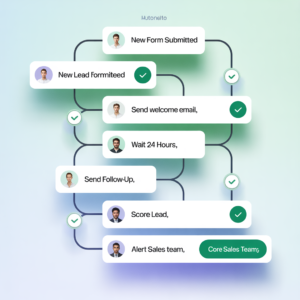
New customer signs up on your website? Zapier adds them to your CRM, sends a welcome email, notifies your Slack channel, and logs the lead in a Google Sheet, all in under three seconds, with zero human involvement.
Zapier Central is an innovative AI workspace that allows you to create and manage AI assistants capable of operating across various applications. By integrating artificial intelligence with Zapier’s renowned automation platform, Central enables the development of bots that function more like collaborative teammates than mere programs.8
The newer Zapier Central layer makes it even more powerful. You can now build AI-powered bots that don’t just move data between apps but actually make decisions within those workflows. They can read incoming emails, determine intent, route tickets, send appropriate responses, and update records, all autonomously.
Top five workflows small and mid-size businesses automate with Zapier right now:
- Lead capture from web forms to CRM with instant email notification
- Social media scheduling triggered by new blog post publication
- Invoice creation in accounting software when a deal closes in the CRM
- Slack alerts when support tickets hit a certain urgency threshold
- Customer onboarding sequences triggered by new purchase events
Who benefits most: Operations managers, marketing teams, e-commerce businesses, SaaS startups, and anyone managing repetitive data tasks across multiple tools.
Estimated time saved per week: 5 to 9 hours, depending on workflow complexity.
Pricing: Free plan available. Paid plans start at $19.99/month. AI features require the Team plan or above.
5. Notion AI — The AI Productivity Tool That Organizes Your Company’s Brain
Every growing business eventually drowns in scattered information. Meeting notes in email. Project details in Slack. SOPs in someone’s Google Drive. Strategies in a deck nobody can find. Notion AI was built to solve exactly that problem.
Notion is already one of the most powerful workspace tools on the market, combining wikis, project management, databases, and documents in one place. The AI layer transforms it from a glorified note-taking app into a genuinely intelligent knowledge management system.
Ask Notion AI to summarize a long meeting doc in three bullet points. Tell it to find every task assigned to a specific team member across multiple project databases. Ask it to generate a first draft of an SOP based on a quick bullet-point outline you wrote. It does all of this without leaving the page you’re already on.
Where Notion AI saves the most time:
- Summarizing long meeting notes and pulling action items automatically
- Drafting SOPs, onboarding docs, and internal knowledge base articles
- Answering questions using your company’s own stored data
- Auto-filling database properties and generating content from templates
Who benefits most: Operations teams, founders managing multiple projects, HR departments building knowledge bases, and any team that struggles with “where is that document?” more than twice a week.
Estimated time saved per week: 4 to 7 hours per team member.
According to the World Economic Forum’s Future of Jobs 2025 report, information and data management skills are among the most in-demand capabilities as organizations integrate AI into daily operations. Tools like Notion AI directly address this shift by making information retrieval faster and less dependent on individual memory.
Pricing: Notion AI starts at $10/user/month, added onto any existing Notion plan.
6. Otter.ai — The AI Agent That Pays Attention in Every Meeting So You Don’t Have To
Nobody walks out of a meeting remembering everything. And the person tasked with “taking notes” is, inevitably, not fully present in the conversation. Otter.ai fixes this without requiring any behavioral change from your team.
Otter.ai joins your Zoom, Google Meet, or Microsoft Teams calls automatically. It transcribes every word in real time, identifies each speaker, highlights key topics, and delivers a clean, searchable summary within minutes of the call ending. No more “can you send me the notes?” No more missed action items. No more six-email threads trying to confirm what was decided.
The AI agent layer goes beyond transcription. Otter can answer questions about what was discussed in a past meeting, pull specific commitments a team member made across multiple calls, and even draft follow-up emails based on the meeting content.
The three things Otter.ai eliminates permanently:
- Post-meeting note compilation (saves 30 to 45 minutes per meeting)
- Action item tracking gaps (reduces missed follow-through by a significant margin)
- “What was decided?” confusion across distributed and hybrid teams
Who benefits most: Executives, sales teams, project managers, and any organization running more than five internal or client-facing meetings per week. Particularly valuable for remote and hybrid teams where miscommunication costs are highest.
Estimated time saved per week: 4 to 6 hours for frequent meeting participants.
The shift to hybrid and remote work has fragmented knowledge and processes. Contextual AI agents unify information, surface insights, and orchestrate workflows across distributed teams, moving beyond linear automation to contextual, adaptive intelligence.9 Otter.ai is one of the most accessible entry points into this category.
Pricing: Free plan available. Pro plan starts at $16.99/user/month.
7. Relevance AI — The No-Code Business Automation Software for Custom Agent Workflows
Most AI tools on this list come pre-built. You install them, connect them to your existing software, and use them more or less as designed. Relevance AI is different. It’s a platform for building your own custom AI agents, tailored exactly to how your business operates.
Relevance AI is a no-code platform that allows you to build and deploy AI agents for automating workflows, enhancing decision-making, and optimizing business operations. It provides an intuitive interface to create AI-powered solutions without requiring complex coding, so that non-technical users can also get started.8
Think of it as the bridge between “I wish there was a tool that did this specific thing” and actually building that tool in an afternoon. You can create an agent that monitors incoming customer support emails, categorizes them by intent, drafts response options, and routes them to the right team member. Or build one that monitors your competitors’ websites and alerts you when pricing or product pages change. Or automate your entire content repurposing workflow from long-form video to social clips to blog posts.
What makes Relevance AI stand out among AI productivity tools:
- Build multi-step agents that connect to APIs, databases, and external services
- No-code interface means marketing, operations, and sales teams can build without IT involvement
- Pre-built agent templates for lead qualification, customer research, and content production
- Connects with tools like HubSpot, Salesforce, Slack, Google Sheets, and hundreds of others
Who benefits most: Growth teams, operations managers, agencies, and startups that have specific automation needs that no off-the-shelf tool quite covers.
Estimated time saved per week: 6 to 15 hours depending on the complexity of agents built, with the highest ROI for businesses that build prospecting, research, or customer service agents.
Pricing: Free plan available. Paid plans start at $19/month.
8. GitHub Copilot — The AI Productivity Tool That Writes Half Your Code
If your business has a development team, GitHub Copilot is not optional anymore. It’s the clearest case study in the entire AI space for measurable productivity gains, and the numbers are hard to ignore.
GitHub Copilot users completed coding tasks 56% faster than non-users5, according to research data cited in McKinsey’s analysis of AI’s impact on software development teams. That’s not a marginal improvement. That’s cutting nearly half the time spent on core development work.
Copilot sits inside the developer’s code editor and suggests entire lines, functions, and blocks of code as they type. It understands context, so it knows what the developer is building and anticipates the next logical step. It writes boilerplate code, generates unit tests, explains confusing legacy code, and catches bugs before they ship.
Who benefits most: Software developers, QA engineers, full-stack teams, and any startup where developer time is the primary constraint on shipping new features.
Estimated time saved per week: 8 to 15 hours per developer.
For broader technical context, McKinsey’s research on AI’s economic potential consistently identifies software engineering as one of the four highest-value categories for generative AI deployment, alongside customer operations, marketing and sales, and R&D.
Pricing: $10/month for individual developers. $19/user/month for business teams.
9. Intuit Assist — The AI Agent Handling Your Business Finances While You Sleep
Small business owners spend an average of several hours per week on financial tasks that add no strategic value. Categorizing expenses. Matching invoices. Chasing late payments. Reconciling accounts. Intuit Assist, built into QuickBooks, automates the entire category.
Best for financial management and included in paid QuickBooks plans starting at $17.50/month, Intuit Assist automates essential financial tasks, increasing accuracy and reducing workload.7
A small business owner could use Intuit Assist to automate invoice processing by categorizing expenses and sending out reminders for overdue payments7, all without logging in to manually manage each transaction.
The agent monitors cash flow patterns and flags anomalies. It generates financial summaries in plain language so you don’t need an accounting degree to understand what’s happening with your money. And it suggests tax categories automatically, reducing the chaos that hits every quarter.
What Intuit Assist handles autonomously:
- Expense categorization and transaction matching
- Invoice generation and overdue payment reminders
- Cash flow trend analysis with plain-language summaries
- Quarterly tax preparation support and deduction flagging
Who benefits most: Small business owners, freelancers, solopreneurs, and any founder doing their own bookkeeping. Also powerful for finance teams in growing companies who want to reduce manual reconciliation time.
Estimated time saved per week: 3 to 5 hours for business owners managing their own finances.
Finance bots reduce manual reconciliation hours by 45%10, a figure consistent with what QuickBooks users report after integrating AI-assisted financial management into their workflows.
Pricing: Included with paid QuickBooks plans, starting at $17.50/month.
AI Agents Comparison Table
| Tool | Best Use Case | Estimated Time Saved / Week | Starting Price |
|---|---|---|---|
| ChatGPT Enterprise | Writing, research, document synthesis | 8–12 hours | $30/user/month |
| Microsoft Copilot | Email, meetings, Office tasks | 6–10 hours | $30/user/month |
| HubSpot Breeze | Sales prospecting, CRM automation | 7–11 hours | $20/seat/month |
| Zapier | Cross-app workflow automation | 5–9 hours | Free / $19.99/month |
| Notion AI | Knowledge management, docs, SOPs | 4–7 hours | $10/user/month |
| Otter.ai | Meeting transcription, summaries | 4–6 hours | Free / $16.99/month |
| Relevance AI | Custom agent building, automation | 6–15 hours | Free / $19/month |
| GitHub Copilot | Code writing, debugging, testing | 8–15 hours | $10/month |
| Intuit Assist | Finance, invoicing, bookkeeping | 3–5 hours | Included w/ QuickBooks |
Your AI Agent Adoption Action Plan: 9 Steps to Start This Week
Bookmark this section. Come back to it on Monday morning and work through it step by step.
- Audit your most time-consuming repetitive tasks first. List the five things you or your team do every week that feel mechanical and low-value. These are your automation targets. If you skip this step, you’ll end up buying tools without knowing what problem they’re solving.
- Start with one AI agent, not five. The biggest adoption mistake is buying multiple tools at once and using none of them well. Pick the single tool from the list above that maps to your #1 time drain and deploy that one fully before adding another.
- Activate Microsoft Copilot if you’re already on Microsoft 365. Check your subscription tier today. You may already have access to a tool saving your team 6 to 10 hours per week that nobody has turned on yet. This is one of the most common (and most expensive) missed opportunities in business.
- Connect HubSpot Breeze’s Prospecting Agent to your existing lead data. If you’re running outbound sales and doing prospect research manually, this single change can return 7 to 11 hours per rep per week. Enable the agent, feed it your ICP (ideal customer profile), and let it start identifying and sequencing leads autonomously.
- Set up at least three Zapier automations in your first week. Start with the highest-frequency, most annoying manual data transfers your team performs. Lead capture to CRM. Form submission to Slack notification. Invoice trigger from closed deal. Each automation is a gift that keeps giving every single day.
- WARNING: Do not automate a broken process. This is the most common mistake businesses make with AI agents. If your sales follow-up process is disorganized, automating it with HubSpot Breeze or Zapier will just produce disorganized follow-ups faster. Clean the process first, then automate it.
- Deploy Otter.ai to every recurring meeting this week. Enable the auto-join feature so it connects to every calendar invite automatically. Within two weeks, you’ll have a searchable archive of every decision, commitment, and idea discussed across your organization’s calls.
- Assign one team member as your AI Champion. This person’s job is to spend two hours per week exploring what’s new, testing prompts, and sharing what’s working. High-performing AI organizations are nearly three times as likely to say they have fundamentally redesigned individual workflows, and intentional workflow redesign has one of the strongest contributions to achieving meaningful business impact of all tested factors.11 You need someone driving that redesign internally.
- Measure the before and after. Before deploying any tool, document the current time cost of the task it replaces. After 30 days, measure again. Where tracking exists, value realisation rises and risk incidents fall.12 Numbers make the case for continued investment and help you identify which tools are earning their keep.
Expert Insight: The Hidden Cost of Waiting
The following perspective is illustrative, drawing from observed industry patterns and documented research trends.
Dr. Sarah Chen, a productivity transformation strategist who has worked with over 200 mid-market businesses on AI adoption, put it plainly in a recent keynote: “The companies I see struggling aren’t the ones that tried AI and failed. They’re the ones that said ‘we’ll wait until it matures a little more.’ That window closed in 2024.”
Her point is backed by a pattern that shows up consistently in the data. While 79% of organizations say they’re ‘using generative AI,’ fewer than 10% report that they’re scaling AI agents in any function. In product development specifically, 73% of respondents are not using AI agents at all.13
That’s the real opportunity. Most businesses are using AI the way they used the internet in 1999, as a curiosity rather than infrastructure. The companies treating AI agents as core operating infrastructure right now are building a productivity lead that compounds monthly.
But Dr. Chen also offers a counterpoint worth sitting with: “The businesses that rush to automate everything at once often create more chaos than they resolve. AI agents amplify your existing processes, for better or worse. If your sales process is unclear or your team isn’t aligned on who follows up with which leads, an AI agent will just automate that confusion at scale.”
The lesson: move fast, but move smart. Fix the process, then automate it.
Respondents who attribute EBIT impact of 5 percent or more to AI use report pushing for transformative innovation via AI, redesigning workflows, scaling faster, implementing best practices for transformation, and investing more.11 The top performers aren’t treating AI as an experiment. They’re treating it as the foundation of how the company operates.
The Window Is Open. It Won’t Stay That Way.
Here’s the core message of everything you just read: AI agents for business are not a future investment. They are a present-tense competitive requirement.
The businesses already deploying these tools are reclaiming 5 to 15 hours per employee per week, compounding that advantage month over month, and building the kind of operational leverage that used to require doubling headcount. The tools exist, the price is accessible, and the learning curve is shorter than it’s ever been.
The three things that matter most right now: start with one tool, deploy it fully before adding more, and measure results so you know what’s working.
What’s actually at stake if you do nothing is harder to talk about but more important to understand. Industries that have embraced AI are now seeing labor productivity grow 4.8 times faster than the global average, while sectors with high AI exposure show 3x higher revenue growth per worker compared to those slower to adopt.1 Your competitors aren’t just going to get more efficient. They’re going to get more efficient at a rate that makes your current pace feel like walking on a treadmill someone else just set to sprint. The businesses that close this article and do nothing aren’t just leaving money on the table. They’re handing market share to the businesses that don’t.
Start Here. Right Now.
CTA: Pick one tool from the comparison table above that maps directly to your biggest weekly time drain. Don’t research it for a week. Go to the website, start the free trial today, and commit to using it for 30 days. One tool. Thirty days. You’ll have your answer