(Read This First 👀)
Samsung didn’t just update One UI 8.5.
They quietly overhauled how your phone feels, looks, and protects you.
If One UI 8 felt good, One UI 8.5 feels… dangerously addictive.
Let’s break down every One UI 8.5 feature that actually matters, without fluff, jargon, or corporate nonsense.
What Is One UI 8.5—and Why It Matters
One UI 8.5 Features mark one of Samsung’s most user-focused updates in recent years.
Instead of chasing flashy gimmicks, Samsung doubled down on:
- Deep customization
- On-device AI
- Privacy-first design
- Everyday usability improvements
In simple terms?
Your phone now bends to you, not the other way around.
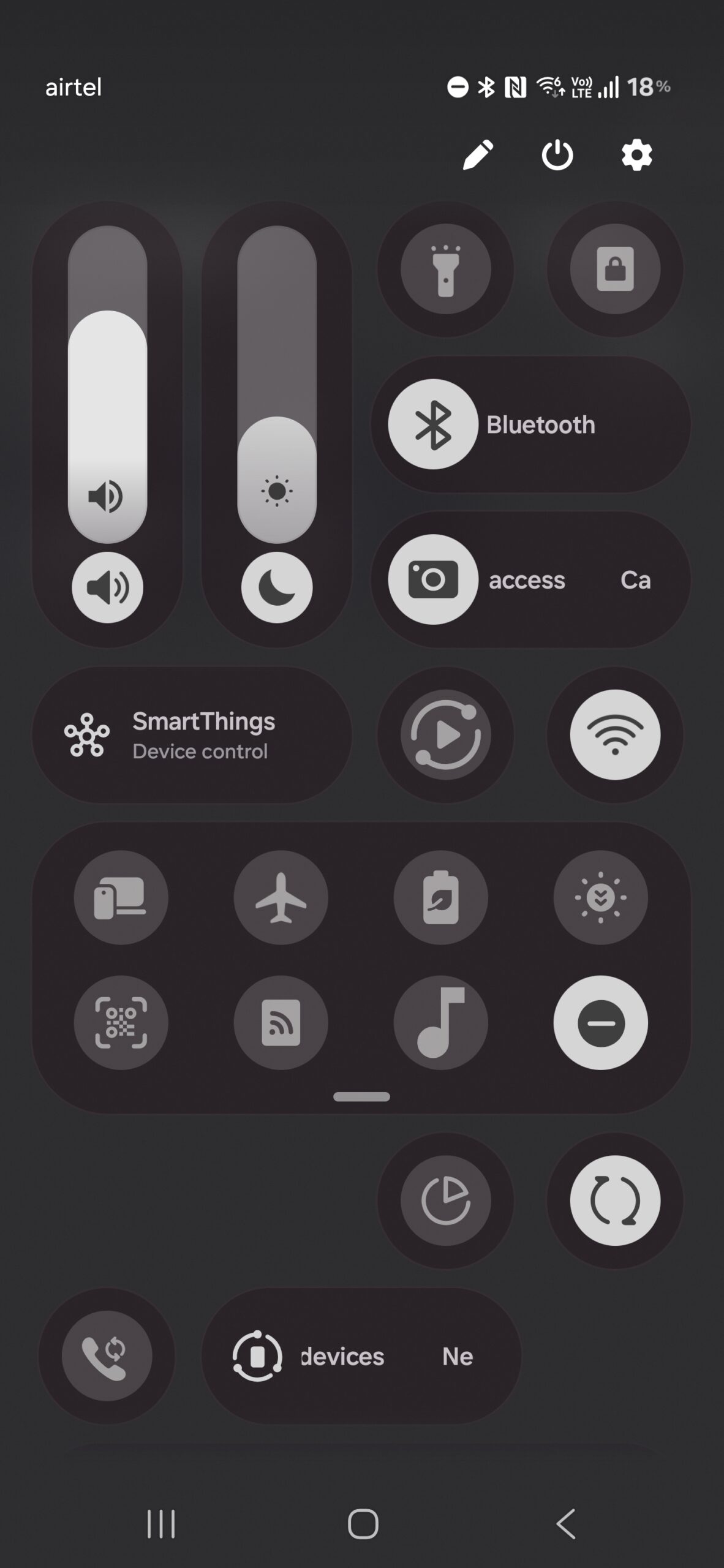
One UI 8.5 Features: Quick Settings Customization Goes Wild
If customization were a sport, One UI 8.5 Features just went pro.
Resizable, Movable, Thumb-Friendly Controls
Samsung finally unleashed full control over the Quick Settings panel.
You can now:
- Drag controls anywhere
- Resize toggles using new grab handles
- Switch between icon, pill, and vertical layouts
- Place brightness and volume sliders exactly where your thumb lives
This isn’t cosmetic—it’s ergonomic freedom.
What You Can Customize
- Brightness & Volume: Vertical or horizontal
- Media Player: Small or expanded
- Quick Toggles: Grid-based or floating
- Animations: Smoother, more expressive
And yes—there’s a Reset to Default button if you go too far. We’ve all been there.
One UI 8.5 Features on the Lock Screen Feel Smarter, Not Louder
Samsung cleaned house here—and it shows.
Cleaner Settings, Zero Clutter
- Removed unnecessary descriptions
- Faster navigation
- Less visual noise
It’s minimalism done right.
New Clock Fonts & Thickness Control
You now get:
- Three new animated fonts
- A thickness slider for almost every clock style
It’s a small change with big personality energy.
Smart Wallpaper Intelligence
This is one of the most underrated One UI 8.5 Features.
Your lock screen now:
- Detects objects (like pets or faces)
- Automatically repositions widgets
- Resizes the clock to avoid blocking the subject
And yes—live weather wallpapers are now easier to enable, showing rain, sun, or clouds in real time.
Hidden One UI 8.5 Features You’ll Accidentally Fall in Love With
Samsung buried some absolute gems.
Transparent Home Screen Folders
You can now:
- Change folder colors
- Adjust transparency
- Make folders fully see-through
Pair that with enlarged folders and it feels like mini app dashboards floating on your screen.
Partial Screen Recording (Finally!)
Instead of recording your entire screen:
- Select only what matters
- Auto-detects content
- Resize recording area manually
Perfect for tutorials, receipts, or that one app you don’t want people seeing.
Instant Calculator Clipboard Magic
Copy a math equation → open Calculator → tap popup → instant answer.
It’s one of those “why wasn’t this always a thing?” moments.
One UI 8.5 Features Bring AI Photo Editing to the Masses
Samsung didn’t just add AI—they made it usable.
New AI Tools Explained Simply
Inside Gallery > Edit, you’ll find:
- Erase – Remove objects naturally
- Move – Relocate subjects with auto-fill
- Create – Sketch something, AI finishes it
- Style – Turn selfies into 3D cartoons
No PhD required.
Edit History Is a Game-Changer
You can now:
- View every edit step
- Revert any change
- Experiment without fear
That’s creative freedom.
Privacy Win (Big One)
Turn on:
Processed data only on device
This ensures:
- AI edits never leave your phone
- No cloud uploads
- Total privacy
Samsung clearly took notes from privacy-focused platforms like
👉 Android Authority’s ultimate Samsung AI breakdown
One UI 8.5 Features Reinvent the Gallery App
The Gallery app didn’t just get prettier—it got smarter.
What’s New
- Rounded UI elements
- Cleaner menus
- Faster navigation
Shot Types (Organized Bliss)
Your media is now auto-grouped by:
- Photos
- Videos
- Portraits
- Selfies
No more endless scrolling.
Private Album (Fingerprint Locked 🔒)
Select photos → Move to Private Album → Unlock with fingerprint.
They disappear instantly.
Only you know where they went.
Samsung’s privacy direction mirrors what they’ve emphasized in
👉 Samsung’s official security-first update guide
One UI 8.5 Features That Protect Your Eyes and Your Data
This update quietly protects you in ways you’ll feel.
Dim Strobing (Eye Saver Mode 2.0)
Located under:
Accessibility → Vision Enhancements
It:
- Automatically dims flashing visuals
- Reduces eye strain
- Makes night viewing dramatically better
Once you try it, you won’t turn it off.
Failed Authentication Lock
Here’s the scenario:
- Phone unlocked
- Someone tries opening WhatsApp or banking apps
- Multiple failed attempts → phone locks instantly
That’s real-world protection.
One UI 8.5 Features Improve Gestures, Clocks, and Daily Tools
Small upgrades that add up fast.
New Back Gesture Preview
You now see:
- A preview of the screen you’re going back to
- Better spatial awareness
- Fewer accidental exits
Clock App Upgrades
- Weather-based alarm backgrounds
- World clock time comparison slider
- Analog + digital stopwatch toggle
Simple. Useful. Thoughtful.
Quick Comparison Table: One UI 8 vs One UI 8.5
| Feature Area | One UI 8 | One UI 8.5 |
|---|---|---|
| Quick Settings | Fixed layout | Fully customizable |
| Lock Screen | Static widgets | Smart repositioning |
| Photo Editing | Basic AI | Advanced generative tools |
| Privacy | App-level locks | Auto device lockdown |
| Gallery | Flat structure | Shot Types + Private Album |
One UI 8.5 Features: Small Details You’ll Appreciate Daily
- Battery background toggle
- Calculator keypress highlights
- Torch control on lock screen
- Search bar moved to bottom (thank you, Samsung)
These aren’t flashy—but they reduce friction. And that matters.
Final Thoughts: Is One UI 8.5 Worth the Hype?
Absolutely—and quietly so.
One UI 8.5 Features aren’t about showing off.
They’re about comfort, control, and confidence.
Samsung didn’t reinvent Android.
They refined how it feels to live with it.
And honestly? That’s the best kind of upgrade.
Call to Action
👉 Share this guide with a fellow Samsung user
👉 Read more hidden Android features
👉 Bookmark this page—you’ll come back to it
If you want, next I can:
- Turn this into a pillar SEO page
- Create internal link clusters
- Optimize it for high-CPC Samsung keywords
- Or rewrite it for Google Discover traffic
Just say the word 🚀