Finally: Build an AI Sales Bot That Closes Deals 24/7
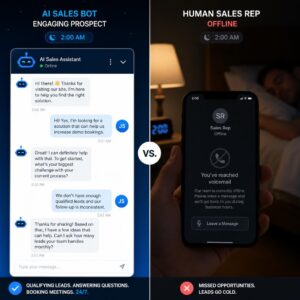
Your best salesperson just quit. And while you were scrambling to replace them, your competitor’s AI sales bot already handled 47 inbound leads, booked 12 demos, and closed three deals.
That’s not hypothetical. That’s where sales is right now.
Introduction: The Sales Problem No Human Can Solve Alone
Here’s an uncomfortable truth most sales leaders already feel but rarely say out loud: your team cannot respond fast enough. Buyers today move on in minutes. Research from conversational AI platforms consistently shows that responding to a lead within five minutes versus 30 minutes dramatically increases conversion. But your reps are human. They sleep. They take weekends. They juggle 40 other tasks.
That gap between when a buyer shows interest and when a human responds is costing you real revenue. Every single day.
The good news is that the solution is not hiring more people. It’s building an AI sales bot — a conversational AI system that engages prospects the moment they land on your site, qualifies them automatically, books meetings without back-and-forth, and follows up relentlessly until a human needs to step in.
This used to sound complicated. It isn’t anymore.
According to Gartner’s 2025 sales research, 95% of seller research workflows will begin with AI by 2027, up from less than 20% in 2024. That shift isn’t coming — it’s already underway, and the businesses building their AI sales infrastructure now are the ones that will own the pipeline.
“AI-influenced sales accounted for over $229 billion in global online sales during the 2024 holiday season alone, up from $199 billion in 2023.” (Source: Emitrr, citing industry data — editor to verify final figure)
The math doesn’t lie. Sales teams equipped with AI tools close deals 81% faster, win 80% more often, and secure 73% bigger deals on average, according to Persana AI’s analysis of documented enterprise deployments.
Think of your AI sales bot like a junior sales rep who never gets tired, never forgets to follow up, and never has a bad day. It handles the top of your funnel with precision, so your best human reps can focus on the conversations that require real relationship-building and judgment.
By the end of this post, you will know exactly how to build an AI sales bot from scratch — which platform to use, how to train it, what to automate first, and how to wire it into your CRM so no lead slips through the cracks.
Let’s get into it.
Why Your AI Sales Bot Needs to Be Built Right Now, Not Next Quarter
The urgency here is not manufactured. It’s structural.
Your buyers have changed. They no longer want to fill out a contact form and wait two days for a response. They want instant answers, instant qualification, and instant access to booking a call — all before they’ve spoken to a single human. A survey by Statista found that 88% of customers report satisfaction with bot-only interactions when the bot actually resolves their query. Speed and accuracy have become the new competitive differentiators.
Meanwhile, the competitive landscape is shifting fast. By 2025, 42% of marketing and sales departments were regularly using generative AI, with adoption reaching 55% in tech-sector sales teams, according to Statista data cited by AI sales platform MagicBlocks. If your competitors haven’t already deployed an AI sales bot, they’re in the process of doing it right now.
And the cost case for building one is overwhelming:
- Conversational AI bots can reduce business operating costs by up to 40%
- Businesses using AI lead scoring see a 50% increase in lead-to-sale conversion rates
- AI-driven personalization can boost customer conversion rates by up to 57%
- Companies replacing traditional follow-up with AI bots saw a 60% drop in operating costs alongside significantly improved conversion rates
- Sales teams using AI are 1.3 times more likely to experience revenue growth than those that don’t
(Figures sourced from industry research by Acuvate, Persana AI, and MagicBlocks — editor to verify specific sources before publishing)
Who needs this most? Any business that has inbound website traffic but no 24/7 coverage. Any sales team running more leads than reps can handle. Any founder who is personally answering sales DMs at 11pm. Any B2B company where the cost of a missed lead is measured in thousands, not tens.
Waiting until next quarter isn’t a neutral decision. Every week without an AI sales bot is a week of leads landing in silence, qualifying themselves out of your funnel, and buying from someone else.
 Alarming: AI Cracks Passwords 1000x Faster Now
Step One: Choosing the Right Platform to Build Your AI Sales Bot
Before you write a single conversation flow, you need to pick the right foundation. This decision shapes everything that follows — how quickly you launch, how deeply the bot integrates with your CRM, and how sophisticated your qualification can get.
Here are the three main categories of AI sales bot platforms you’ll encounter:
Ready-to-use chatbot platforms — These are the fastest to deploy and require zero coding. Platforms like HubSpot’s Chatbot Builder, Tidio, and Intercom let you drag-and-drop conversation flows, connect to your CRM, and go live in an afternoon. The tradeoff is limited customization for complex sales logic.
AI-native conversational platforms — Tools like Drift (now part of Salesloft) and Intercom Fin are purpose-built for sales and customer conversations. Drift specializes in account-based marketing and sales handoff orchestration. Intercom Fin uses AI to resolve queries directly from your knowledge base and support docs. These are more powerful but carry higher price points and steeper learning curves.
Open and developer-forward platforms — Botpress, Voiceflow, and similar tools give you full control over conversation logic, external API connections, and multi-step flows. They require more setup but unlock sophisticated qualification logic, dynamic data pulls, and truly custom bot behavior. These platforms connect to HubSpot and other CRMs through APIs, webhooks, or automation layers like Zapier or Make.
Which platform should you start with?
For most small to midsize businesses building their first AI sales bot: start with HubSpot’s Chatbot Builder if you’re already in the HubSpot ecosystem, or Tidio if you need something fast and affordable. Both support no-code setup, native CRM sync, and solid lead qualification flows. As your bot matures and your needs get more sophisticated, you can migrate to a more powerful platform or bolt on additional tools.
Actionable takeaway: Before choosing, audit your existing tech stack. If you already use HubSpot for your CRM, start there — native integration eliminates data sync headaches from day one. If you’re on Salesforce or another CRM, check which platforms offer native connectors versus middleware requirements, and choose accordingly.
Step Two: Defining What Your AI Sales Bot Actually Does
This is where most businesses go wrong. They build a bot and ask it to do everything at once — answer support questions, qualify leads, book demos, handle objections, close sales — and end up with a confused, underperforming mess that frustrates visitors instead of converting them.
Your AI sales bot needs a clearly defined job before it gets a single conversation flow.
Start by deciding your bot’s primary mission. The three most common and proven roles for a sales bot are:
- Lead capture and qualification — The bot greets visitors, asks qualifying questions (company size, budget, timeline, decision-making authority), scores them, and either routes high-quality leads to a human rep or books a meeting directly. This is the highest-ROI use case for most B2B businesses.
- Meeting scheduling — The bot’s only job is to book demos and discovery calls. It asks two or three qualifying questions, checks your calendar, offers available slots, and confirms the booking automatically. Simple, focused, and highly effective.
- 24/7 FAQ and sales support — The bot handles common pre-purchase questions (pricing, features, comparisons, trial options), reducing the load on your human team while keeping prospects engaged until they’re ready to talk to a person.
HubSpot’s real-world documentation of their own SalesBot is instructive here. When they first built it, the team trained it on a specific qualification framework (GPCT — Goals, Plans, Challenges, Timeline), which gave the bot a clear, structured way to guide every conversation toward a next step. That focus lifted their qualified lead conversion rate measurably over time.
Actionable takeaway: Write a one-sentence mission statement for your bot before you open any platform. “This bot qualifies inbound leads visiting our pricing page and books calls for prospects who meet our ideal customer profile.” That sentence becomes the filter for every decision you make in the build process.
Step Three: Building Your Conversation Flows the Right Way
Your AI sales bot’s conversation flows are the soul of the thing. A rigid, robotic flow that feels like filling out a government form will tank your conversion rate. A natural, branching conversation that mirrors how your best human reps open a call will win.
Here’s how to build flows that convert:
Start with your welcome message. This is the first thing every visitor sees, so make it specific and helpful, not generic. “Got questions about pricing?” outperforms “How can I help you today?” every time because it signals that the bot understands why the visitor is probably on that page.
Build branches for each intent. A visitor on your pricing page has different intent than a visitor on your blog. Set up separate flows for your highest-traffic, highest-intent pages. At minimum: your pricing page, your product or services page, and your homepage. Use conditional logic to route visitors differently based on their answers.
Write for conversation, not interrogation. Your bot’s questions should feel like a curious colleague asking smart questions, not a form that demands data before offering value. Instead of “What is your company’s annual revenue?” try “Roughly how big is your team? Just helps us make sure we’re pointing you in the right direction.”
Define your qualification criteria upfront. What makes a lead worth passing to a human rep? Budget range, company size, timeline, buying authority — pick two to four criteria and build questions that reveal them naturally. Anything that doesn’t surface qualification data is probably a question you don’t need.
Set up the human handoff properly. Your bot needs to know when to step back. Build a clear trigger: if a visitor indicates they’re ready to talk, or if a conversation hits a complexity the bot can’t handle, route immediately to live chat or book a meeting. A frustrated visitor who wanted a human and got more bot responses is worse than a visitor who got no bot at all.
Test your flows as a prospect would. Before going live, walk through every branch of your bot as if you were a first-time visitor. Notice where it feels clunky, where questions are confusing, and where the flow breaks. Fix those moments before they cost you real leads.
Actionable takeaway: Build your first flow for one specific page — your pricing page or your primary product page. Get that one flow converting well before expanding to the rest of your site. A single great flow beats five mediocre ones every time.
Step Four: Training Your AI Sales Bot on Your Business
A generic AI chatbot answers generic questions. A trained AI sales bot represents your business specifically — its pricing, its objections, its ideal customer, its tone, and its value proposition. The difference in performance between the two is significant.
Most modern conversational AI platforms support training your bot through knowledge bases — documents, FAQs, product pages, and sales scripts that the AI uses to generate accurate, on-brand responses.
Here’s what to feed your AI sales bot during training:
- Your top 20 most common sales questions and their answers — Pull these from your email inbox, your CRM notes, and your team’s memory. These are the questions every rep answers on every discovery call.
- Your pricing page and product/service descriptions — The bot needs to speak accurately about what you offer, how it’s priced, and what differentiates you.
- Your ideal customer profile — Define who the bot should treat as a high-priority lead and who it should qualify out early. This shapes how it scores and routes conversations.
- Your sales objection playbook — The most common objections your prospects raise, and how your best reps address them. Train your bot to handle “we don’t have budget right now” or “we’re evaluating three vendors” with the same nuance a skilled rep would.
- Your brand voice guidelines — Is your tone formal or conversational? Technical or accessible? Friendly or professional? The bot should sound like your brand, not like a generic robot.
HubSpot’s documented experience with their own SalesBot confirms this principle: “AI is only as good as the human program it learns from.” Before they automated anything at scale, they spent years training on real conversations handled by skilled chat agents. That foundation became the blueprint for the AI’s behavior.
You may not have years of chat transcripts. But you have something equivalent: your email archives, your CRM notes, your sales scripts, and your team’s collective knowledge. Mine it deliberately before your bot goes live.
Actionable takeaway: Create a “bot training document” — a single file that contains your FAQs, product descriptions, objection responses, and qualification criteria. Feed this document into your platform’s knowledge base feature. Update it quarterly as your products, pricing, or common objections evolve.
[INTERNAL LINK: how to write a knowledge base for AI customer service tools]
Step Five: Connecting Your AI Sales Bot to Your CRM and Calendar
An AI sales bot that doesn’t sync to your CRM is just a fancy contact form. The power of the system comes from what happens after the conversation ends.
Every qualified lead your bot captures should flow automatically into your CRM as a new contact, complete with the conversation data, qualification answers, and lead score. Your sales reps should open their CRM each morning to a queue of pre-qualified leads — each one labeled with what they told the bot, what they’re interested in, and how urgently they need a solution.
Here’s the core integration stack to set up:
CRM sync: Connect your bot platform to your CRM (HubSpot, Salesforce, Pipedrive, or whichever you use) so every conversation creates or updates a contact record automatically. Map your bot’s qualification questions to CRM fields. If the bot asked “How big is your team?” that answer should populate a “Company Size” field in your CRM, not disappear into a chat log no one reads.
Calendar integration: Connect your bot’s meeting scheduler to your calendar system (Google Calendar or Outlook). The bot should check real-time availability and book meetings that actually land on your calendar — not send a link that may or may not work. Most major platforms support this natively. Set buffer times between meetings to prevent back-to-back booking.
Lead routing rules: Define routing logic so high-priority leads go to your most experienced rep, while general inquiries go to a junior rep or into a nurture sequence. If your bot identifies a prospect at an enterprise-sized company with a Q2 budget, that conversation should ping your senior account executive immediately, not sit in a shared inbox.
Follow-up automation: Set up automated follow-up sequences triggered by your bot conversations. A visitor who the bot qualified but who didn’t book a meeting should receive a follow-up email within 15 minutes, then another at 24 hours, then another at 72 hours. This sequence can run entirely in your CRM or email automation platform with no human involvement.
Notification setup: Configure your AI sales bot to send real-time alerts to your team via Slack or email when a high-value lead engages. Kandji, a device management company, documented exactly this approach: their AI chat system sends Slack alerts to sales teams when prospects respond, enabling near-instant human conversation pickup for the highest-priority leads.
Actionable takeaway: Draw a simple flowchart of what should happen after a bot conversation ends before you configure any integrations. Lead captured but not qualified → nurture sequence. Lead qualified but didn’t book → immediate follow-up email. Lead qualified and booked → CRM contact created plus rep notification. Map the outcomes first, then wire the integrations to match.
Step Six: Deploying Your AI Sales Bot on the Right Channels
Your AI sales bot doesn’t have to live only on your website. Modern conversational AI platforms support multi-channel deployment, meaning the same bot logic can run across your website, LinkedIn, WhatsApp, Instagram DMs, SMS, and Facebook Messenger from a single configuration.
The channel question matters because your buyers are not all in the same place. B2B buyers research on LinkedIn and your website. E-commerce shoppers engage through Instagram and SMS. Service-based businesses often get inquiries through WhatsApp and Messenger.
Here’s how to think about channel prioritization:
Start with your website. Your website is the highest-intent channel — a visitor who lands on your pricing page or your “contact us” page has already self-selected as interested. Deploy your AI sales bot here first, specifically on your three to five highest-traffic, highest-intent pages.
Add LinkedIn outreach automation with care. Some platforms support AI-powered LinkedIn outreach — automated connection messages, follow-ups, and qualification sequences. This can be powerful for B2B prospecting, but requires careful calibration. LinkedIn’s algorithm flags aggressive automation, so keep message volume reasonable and personalization high.
Expand to SMS and WhatsApp for high-velocity businesses. If your business gets a lot of inbound interest through mobile channels, deploying your bot via SMS or WhatsApp can dramatically improve response rates. Research consistently shows SMS response rates far exceed email — and for time-sensitive offers or inbound inquiries, that speed advantage translates directly to conversions.
Set channel-specific tone. Your website bot can be slightly more formal and detailed. Your WhatsApp bot should be conversational and brief. Your SMS bot should be extremely concise with a clear single call-to-action. The same qualification logic can run underneath all three, but the conversation style should match the channel.
Actionable takeaway: In your first 30 days, focus exclusively on your website. Add one additional channel only after your website bot is running smoothly and you have data on what conversations are converting. Multi-channel works best when you’re building on a proven foundation, not simultaneously learning across five different channels at once.
Step Seven: Measuring, Optimizing, and Scaling Your AI Sales Bot
Your AI sales bot is not a one-time project. It’s a living system that improves with data, iteration, and deliberate optimization. The businesses that get the highest ROI from their sales bots treat them like a product, not a setup task.
HubSpot’s internal documentation of their SalesBot journey makes this vivid: over two years, they moved from rule-based bots to a retrieval-augmented generation (RAG) system, upgraded their underlying AI model, and added smarter qualification logic. Those upgrades doubled response speed, improved accuracy, and lifted their qualified lead conversion rate from 3% to 5%.
Here’s what to track from day one:
- Engagement rate: What percentage of visitors who see the bot actually start a conversation? If this number is low, your welcome message or timing is off.
- Qualification rate: Of visitors who engage, what percentage reach the end of your qualification flow? Low completion means your flow is too long, too intrusive, or not valuable enough.
- Meeting conversion rate: Of qualified leads, what percentage book a meeting? This tells you whether your bot is doing its sales job or just collecting data.
- Lead-to-close rate: Of bot-generated leads, what percentage ultimately become customers? This is your north star metric — everything else serves this number.
- Bot drop-off points: Where in the conversation do visitors stop responding? These are your friction points and should be redesigned.
Run your first optimization cycle at 30 days. Look at your drop-off data, rewrite the questions or branches where visitors are exiting, and test new welcome messages on your highest-traffic pages. By 90 days, your bot should be generating consistent, measurable pipeline contribution.
Actionable takeaway: Set a recurring 30-minute calendar block every two weeks specifically for reviewing your bot’s conversation data and making one small improvement. Bots that get regular attention outperform bots that are configured once and left alone. Think of it as a recurring performance review for your best-performing virtual sales rep.
[INTERNAL LINK: how to measure ROI from AI sales and marketing automation]
AI Sales Bot Platform Comparison: What to Use, When, and What It Costs
Use this table to identify the right starting point for your business based on your budget, technical capacity, and primary use case.
| Platform | Best For | Time to Launch | Monthly Cost (Est.) | CRM Integration | AI Sophistication |
|---|---|---|---|---|---|
| HubSpot Chatbot Builder | Teams already using HubSpot CRM | 1–2 hours | Free tier available; paid from ~$20/mo | Native (HubSpot only) | Moderate |
| Tidio | Small businesses and e-commerce | 30–60 minutes | Free tier; paid from ~$29/mo | Via native connectors | Moderate |
| Intercom Fin | Support-heavy businesses with sales overlap | 2–4 hours | From ~$74/mo | Native + third-party | High |
| Drift (Salesloft) | Enterprise B2B and ABM-focused teams | 3–5 hours | From ~$2,500/mo | Native + Salesforce | Very High |
| Botpress | Developers needing full custom logic | 1–3 days | Free to start; scales with usage | Via API/webhooks | Very High |
| Tidio + Zapier + HubSpot | Non-HubSpot teams needing CRM sync | 3–6 hours | ~$50–$100/mo combined | Via Zapier middleware | Moderate |
The verdict: For most growing businesses, HubSpot Chatbot Builder or Tidio delivers the best balance of speed, cost, and capability at launch. Scale to Intercom Fin or Botpress when your bot needs to handle complex multi-step qualification logic or deep CRM customization.
Your 9-Step Action Plan: Build Your AI Sales Bot This Week
This is your bookmarkable, step-by-step playbook. Follow it in order and you will have a functioning AI sales bot live on your website within five business days.
1. Define your bot’s one primary mission. Write a single sentence describing exactly what your bot should accomplish. “Qualify inbound leads on our pricing page and book calls for prospects with teams over 10 people.” This sentence filters every build decision. Skip this step and you’ll build a bot that tries to do everything and excels at nothing.
2. Choose your platform based on your CRM. If you use HubSpot, start with HubSpot Chatbot Builder — native integration saves hours of middleware configuration. If you use a different CRM, choose a platform with a native connector or a well-documented Zapier integration. Trying to build a custom API connection in your first week will delay your launch by weeks.
3. Write your qualification criteria before opening the builder. Identify your two to four lead qualification signals — the answers that tell you a prospect is worth a human rep’s time. Company size? Budget range? Timeline? Title or decision-making authority? These become your bot’s core questions and your routing logic. If you don’t know what a “good lead” looks like, your bot won’t know either.
4. Build your first flow for one high-intent page only. Choose your pricing page, your primary product page, or your contact page. Build one flow that handles that specific visitor. Get it clean and functioning before expanding to other pages. A focused single-page bot that converts well beats a site-wide bot that performs inconsistently.
5. Feed your bot its training material. Compile your top 20 FAQs, your product descriptions, your pricing, your common objections, and your brand voice guidelines into a single training document. Upload this to your platform’s knowledge base feature. This is what separates a generic chatbot from an AI sales bot that actually represents your business.
6. Connect your CRM, calendar, and notification system. Map bot conversation fields to CRM contact properties. Connect your calendar for real-time meeting booking. Set up Slack or email alerts for high-priority lead notifications. Test every integration before going live — a broken CRM sync means leads captured by the bot vanish into a void with no follow-up.
WARNING — The most common and costly mistake: Launching your bot without testing the entire flow end-to-end as a real prospect would experience it. Walk through every branch of your conversation yourself, then have someone unfamiliar with your business do the same. You will catch at least two or three critical issues that would otherwise cost you real leads.
7. Set up automated follow-up sequences for non-converters. Build follow-up email sequences for prospects who engage with the bot but don’t book a meeting. Sequence one: 15 minutes after conversation, a personalized follow-up with a clear CTA to book. Sequence two: 24 hours later, a value-add email (case study, relevant blog post, or demo video). Sequence three: 72 hours later, a final low-pressure check-in. This sequence should run in your CRM or email automation platform with zero manual involvement.
8. Go live and monitor conversations daily for the first two weeks. Read every bot conversation in your first 14 days. You will discover which questions confuse visitors, where the flow breaks down, and what objections come up that your training material didn’t address. This daily monitoring period is irreplaceable. It compresses months of learning into two weeks and gives you specific, actionable improvements to implement immediately.
9. Schedule your first optimization review at day 30. Block 30 minutes on your calendar, 30 days from launch, to review your key metrics: engagement rate, qualification completion rate, and meeting conversion rate. Identify your single biggest friction point and fix it. Run a second review at 60 days and a third at 90 days. By month three, your bot should be generating consistent, measurable pipeline — and you should have a clear picture of where to invest next.
Case Study: How One B2B SaaS Startup Turned Its AI Sales Bot Into a $400K Pipeline (Illustrative)
Marcus Rivera ran a 12-person B2B SaaS startup focused on HR compliance software. His sales team consisted of three account executives who split their time between sourcing their own leads, responding to inbound inquiries, and managing their existing accounts. The problem was that the inbound inquiries came in bursts — heavy on Monday mornings and Friday afternoons — and the team simply couldn’t respond fast enough. Leads that came in after 5pm on a Friday sat unanswered until Monday morning.
At the 48-hour mark, their research showed, the probability of qualifying an inbound lead dropped by more than 70%.
Marcus’s mistake before building the bot: he attempted to solve the problem by hiring a part-time lead response coordinator, spending $2,200 per month on a role that still left nights and weekends uncovered.
He shut down that hire after 60 days and instead invested eight hours building an AI sales bot on Intercom Fin, connected to his Salesforce CRM. The bot was trained on his company’s compliance software documentation, their pricing tiers, their qualification criteria (company size over 50, regulated industry, Q-within-90-days budget), and their five most common sales objections.
He deployed it on his pricing page and his demo request page. Within the first 30 days, the bot engaged 283 visitors, qualified 61 of them using his criteria, and booked 29 demo calls directly into his reps’ calendars — 12 of which occurred outside business hours.
Six months in, the AI sales bot had contributed to $400,000 in attributed pipeline, including four enterprise deals that originated from after-hours conversations the bot captured and qualified before routing to a rep the next morning.
The lesson: Marcus didn’t replace his human team. He extended their reach to every hour of every day, with a qualification standard as good or better than a junior SDR — at a fraction of the cost of adding headcount.
One caveat worth acknowledging, noted by Marcus in a team retrospective: the bot’s performance improved significantly between month one and month three as they fed it more real conversation data and refined their routing logic. The first version was good. The third version was transformative. Expect the same trajectory from your own build.
Frequently Asked Questions About Building an AI Sales Bot
How long does it take to build an AI sales bot for my business? For most small and midsize businesses using a no-code platform like HubSpot Chatbot Builder or Tidio, the core bot can be live within one to two days. This includes writing your conversation flows, uploading your training materials, connecting your CRM, and testing the integration. More sophisticated bots built on platforms like Botpress or Intercom Fin typically take three to seven days to configure well. Allow two additional weeks of active monitoring before considering your bot fully optimized.
Do I need a developer to build an AI sales bot? Not for the major no-code platforms. HubSpot, Tidio, Intercom, and similar tools use visual drag-and-drop builders that require no coding knowledge. If you want to build a more sophisticated bot with custom API connections, dynamic data pulls, or complex conditional logic — platforms like Botpress support developer-friendly configuration. But the vast majority of small business use cases are fully buildable without writing a single line of code.
How does an AI sales bot qualify leads automatically? An AI sales bot qualifies leads by asking structured questions designed to reveal the same signals your human reps look for: company size, budget range, decision timeline, and buying authority. You define your qualifying criteria upfront, and the bot routes visitors accordingly — high-scoring prospects to a meeting booking flow, lower-scoring visitors to a nurture sequence or FAQ flow. Platforms like Intercom Fin and HubSpot support conditional routing logic that branches the conversation based on each answer.
What is the ROI of an AI sales bot for a small business? ROI varies by business, but documented results from conversational AI deployments are striking. Conversational AI can reduce business costs by up to 40%, while businesses using AI for lead scoring see 50% higher lead-to-sale conversion rates. One documented Superchat case showed over $60,000 in annual recurring revenue generated directly through their AI chatbot within its first year. The primary financial return comes from converting leads that previously fell through the cracks — after-hours inquiries, visitors who left before a human could respond, and leads who self-qualified out due to slow follow-up.
Can an AI sales bot fully replace a human sales rep? No, and it shouldn’t try to. The strongest documented results come from AI-human hybrid models, not pure AI replacement. Your AI sales bot handles the top of funnel: greeting visitors, answering FAQs, qualifying prospects, and booking meetings. Your human reps handle the bottom of funnel: complex objections, negotiations, relationship-building, and closing. HubSpot’s own SalesBot documentation is explicit on this point — the bot cannot build custom quotes, handle nuanced objections, or replicate empathy in complex conversations, and that’s a feature, not a bug. It keeps your best reps focused on the work only humans can do.
What You’re Losing Every Day You Wait
Here’s the quiet truth under everything in this post: the gap between businesses using AI sales bots and those that aren’t is not staying the same size. It’s widening.
The businesses that built their AI sales infrastructure in 2024 spent 2025 iterating and improving it. Their bots are now significantly smarter than a first-generation deployment. By the time a business starts building in 2026, they’re not catching up — they’re starting from behind while competitors have a 12 to 24-month head start in training data, optimization cycles, and pipeline contribution.
Three things to remember: First, an AI sales bot is not a replacement for your sales team — it’s infrastructure that makes every rep on your team more effective by handling the repetitive, time-sensitive work they shouldn’t be doing manually. Second, building one is genuinely achievable in a single week using no-code platforms that require no technical background. Third, the cost of building is now lower than the cost of not building — every week of uncaptured after-hours leads, slow follow-up, and unqualified pipeline is a real financial loss you can calculate.
The buyers who land on your website tonight will get a response from somewhere. The only question is whether that response comes from your AI sales bot or from a competitor who already built one.
Your pipeline doesn’t wait for convenient timing. Neither should you.
Start Building Today
Primary CTA: Pick one platform from the comparison table above and sign up for a free trial in the next 24 hours. Don’t spend three weeks comparing options. Start with HubSpot Chatbot Builder if you’re already in HubSpot, or Tidio if you’re starting fresh. Get your first flow live on your pricing page by the end of the week. The only way to understand how an AI sales bot changes your pipeline is to run one inside your actual business.