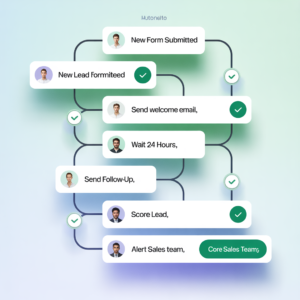
Here’s the truth: small business owners are drowning in repetitive tasks. Between invoicing, customer emails, data entry, and scheduling, you’re spending 30-40% of your week on work that doesn’t move the needle. Meanwhile, your competitors are using AI to automate these exact processes and watching their profit margins climb. The question isn’t whether AI process automation works—it’s why you’re not using it yet.
The landscape has shifted dramatically. What once required expensive enterprise software now fits in your budget. Small businesses that embrace AI automation aren’t just surviving; they’re thriving with leaner teams and fatter bottom lines.
What AI Process Automation Actually Means (And Why It Matters)
Understanding the Basics
AI process automation combines artificial intelligence with workflow automation to handle repetitive business tasks without human intervention. Think of it as hiring a tireless digital employee who never takes vacation, makes mistakes, or asks for a raise.
The magic happens when AI learns your business patterns. It doesn’t just follow rigid rules like traditional automation—it adapts, improves, and gets smarter over time. This is where the real profit gains emerge.
Why Small Businesses Are the Perfect Fit
Larger enterprises have been automating for years, but they’re burdened by legacy systems and complex infrastructure. Small businesses? You’re agile. You can implement AI solutions quickly, see results in weeks, and pivot when needed.
The cost barrier that once kept automation out of reach for small operations has crumbled. Cloud-based AI tools now operate on subscription models, meaning you pay for what you use. No massive upfront investment. No IT department required.

The Five Ways AI Automation Boosts Your Bottom Line
1. Slashing Labor Costs Without Cutting Staff
Here’s where the profit magic happens. When AI handles routine tasks, your team focuses on high-value work that actually generates revenue.
Consider this: if one employee spends 15 hours weekly on data entry, that’s roughly $7,500 annually (at $25/hour) spent on non-revenue work. Multiply that across your team, and you’re looking at tens of thousands disappearing into administrative quicksand.
AI automation reclaims this time. Your staff shifts to client relationships, strategy, and creative problem-solving—the work that builds your business. You don’t necessarily fire anyone; you redeploy them smarter.
2. Eliminating Human Error and Reducing Costly Mistakes
Humans are brilliant but imperfect. A misplaced decimal in an invoice, a missed follow-up email, a double-booked appointment—these small errors compound into significant financial losses.
AI doesn’t get tired. It doesn’t have bad days. It processes information with consistent accuracy, reducing errors by up to 90% in data-heavy processes. When you’re talking about financial transactions, customer records, or compliance documentation, that reliability translates directly to saved money.
3. Accelerating Revenue Cycles
Speed is profit. When invoices go out faster, you get paid faster. When leads are qualified automatically, your sales team closes deals quicker. When customer issues are resolved without human delay, satisfaction and retention improve.
AI automation compresses timelines throughout your business. Faster invoicing means better cash flow. Quicker lead qualification means higher conversion rates. Immediate customer support means reduced churn. Each acceleration point feeds directly into profitability.
4. Scaling Without Scaling Costs
Traditional growth requires hiring more people. More people means more salaries, benefits, office space, and management overhead. It’s a linear cost structure that limits profitability.
AI breaks this model. You can handle 10 times the customer volume without proportionally increasing labor costs. Your automation infrastructure scales effortlessly while your overhead remains relatively flat. That’s exponential profit potential.
5. Unlocking Data-Driven Decision Making
AI doesn’t just automate tasks—it collects and analyzes data at scale. You suddenly have crystal-clear visibility into what’s working and what isn’t.
Which marketing channels drive the most profitable customers? Which products have the highest margins? Which processes leak the most time? AI reveals these insights automatically, letting you make strategic decisions based on facts rather than gut feelings. Better decisions mean better resource allocation and higher returns.
Real-World Examples: How Small Businesses Are Winning
The E-Commerce Store That Tripled Order Processing Speed
Sarah runs an online boutique with a small team. She was spending 8 hours daily on order processing, inventory updates, and customer notifications. She implemented an AI automation platform that now handles 95% of these tasks automatically.
Result? Her team processes three times the orders with the same headcount. Revenue increased 40% in six months, while labor costs stayed flat. That’s pure profit growth.
The Service Business That Reclaimed 20 Hours Weekly
Marcus manages a digital marketing agency with five employees. Client onboarding involved manual form processing, data entry, and email sequences. He deployed AI automation to handle the entire workflow.
Now, clients self-serve through intelligent forms, data populates automatically into his systems, and welcome sequences trigger without human touch. Marcus’s team gained 20 hours weekly to focus on strategy and client results. Client satisfaction improved, retention increased, and profitability jumped 35%.
The Accounting Firm That Reduced Invoice Processing by 80%
Jennifer’s accounting practice was hemorrhaging time on invoice data entry and reconciliation. She integrated AI with her accounting software to automatically capture, categorize, and reconcile invoices.
Processing time dropped from 2 hours per batch to 12 minutes. Her team now handles 5 times the client volume. Revenue grew while labor costs decreased—the holy grail of small business profitability.
The Implementation Roadmap: Getting Started Without the Headache
Step 1: Audit Your Processes
Start by identifying where your time actually goes. Track activities for two weeks. Which tasks consume the most hours? Which are most repetitive? Which cause the most errors?
Look for processes that are:
Highly repetitive (same steps every time)
Rule-based (clear if-then logic)
Data-heavy (lots of information moving between systems)
Time-consuming (significant hours invested)
These are your automation goldmines.
Step 2: Prioritize High-Impact Opportunities
Not all automations are created equal. Focus first on processes that directly impact revenue or consume the most resources.
High-impact targets typically include:
Invoice and payment processing
Lead qualification and nurturing
Customer support and ticketing
Data entry and reconciliation
Appointment scheduling and reminders
Email marketing and follow-ups
Step 3: Choose the Right Tools
The AI automation landscape has exploded with options. Some popular platforms for small businesses include:
Zapier: Connects apps and automates workflows without coding
Make (formerly Integromat): Visual workflow builder with advanced automation
HubSpot: All-in-one platform with built-in automation
Airtable: Database with powerful automation capabilities
Microsoft Power Automate: Enterprise-grade automation accessible to small teams
Start with platforms that integrate with tools you already use. The less disruption to existing workflows, the faster your adoption.
Step 4: Implement Gradually
Don’t try to automate everything simultaneously. Pick one high-impact process, implement it thoroughly, measure results, then expand.
This approach allows you to:
Identify issues before they scale
Build team confidence with early wins
Adjust workflows based on real-world performance
Manage change without overwhelming your team
Step 5: Measure and Optimize
Track metrics before and after implementation. How much time did you save? What was the error reduction? How did this impact revenue?
Use these metrics to justify further investment and identify the next automation opportunity. Most small businesses see ROI within 2-3 months on their first automation project.
Common Obstacles and How to Overcome Them
Obstacle Challenge Solution
Integration Complexity Existing systems don’t talk to each other Use integration platforms like Zapier or API connectors; consider consolidating tools
Change Resistance Team fears job loss or workflow disruption Communicate clearly that automation enhances roles; retrain on new responsibilities
Upfront Learning Curve Takes time to set up and configure Start with simple automations; use vendor training resources; consider hiring a consultant
Data Quality Issues Garbage in, garbage out Clean and standardize data before automating; establish data governance practices
Scalability Concerns What works now might break at higher volumes Build automation with growth in mind; test with larger datasets before full rollout
Cost Justification Difficult to predict ROI upfront Calculate time savings conservatively; track actual metrics post-implementation
The Financial Impact: Numbers That Matter
Conservative Profit Impact Calculation
Let’s work through a realistic scenario for a 10-person small business:
Average employee cost: $50,000 annually (salary + benefits)
Time spent on automatable tasks: 25% of workweek
Annual cost of automatable work: $125,000 (10 employees × $50,000 × 25%)
AI automation platform cost: $2,000-5,000 monthly ($24,000-60,000 annually)
Implementation and training: $5,000-10,000 one-time
Year One Results:
Time reclaimed: 1,250 hours (10 employees × 5 hours weekly × 50 weeks)
Value of reclaimed time: $62,500
Automation costs: $35,000-70,000
Net profit impact: -$7,500 to +$27,500
Year Two and Beyond:
No implementation costs
Automation platform cost: $24,000-60,000
Value of reclaimed time: $62,500
Net profit impact: +$2,500 to +$38,500 annually
Plus indirect benefits:
Faster cash flow from accelerated invoicing
Reduced error-related costs
Improved customer retention from better service
Revenue growth from team focus on high-value work
These indirect benefits often exceed direct labor savings.
The Future Is Now: Why Waiting Costs You Money
The Competitive Reality
Your competitors are already moving. A 2024 survey found that 73% of small businesses plan to implement or expand AI automation within the next 18 months. If you’re not in that group, you’re falling behind.
Early adopters gain:
Operational efficiency advantage
Cost structure advantage
Customer experience advantage
Market positioning advantage
Each month you delay is a month your competitors gain ground.
The Technology Is Mature
This isn’t experimental anymore. AI process automation has moved from “nice to have” to “business critical.” The technology works. The ROI is proven. The barriers to entry are lower than ever.
Your Team Is Ready
You might think your team lacks technical skills for AI implementation. You’d be wrong. Modern AI automation platforms are designed for non-technical users. If you can use email and spreadsheets, you can implement basic automation. For complex workflows, affordable consultants can help.
Action Plan: Your Next 30 Days
Week 1: Audit and Learn
Document your top 5 time-consuming processes
Research AI automation tools relevant to your industry
Watch 3-4 tutorial videos on your chosen platform
Week 2: Plan and Prepare
Select your first automation project (start small)
Map out the current workflow step-by-step
Identify data sources and integration points
Week 3: Implement and Test
Build your first automation
Test thoroughly with real data
Refine based on results
Week 4: Deploy and Measure
Roll out to your team
Track metrics (time saved, errors reduced, etc.)
Plan your next automation project
The Bottom Line
AI process automation isn’t a luxury for big corporations anymore. It’s an essential tool for small business profitability. The businesses that implement it now will have significant competitive advantages in 2-3 years.
You don’t need to automate everything. You don’t need massive budgets. You don’t need a technical team. You just need to start with one process, measure the results, and expand from there.
The profit gains are real. The implementation is achievable. The time to act is now.
Your competitors aren’t waiting. Why should you?
Key Takeaways
AI automation reclaims 20-40% of team time currently spent on repetitive tasks
Direct profit impact ranges from $2,500 to $38,500+ annually for small businesses
Implementation costs are lower than ever with cloud-based platforms
ROI typically appears within 2-3 months
Start small, measure results, then scale
Waiting costs you money in competitive disadvantage
Focus Keywords: AI process automation, small business automation, business process automation, AI automation tools, automation for small business
Tags: #AIAutomation, #SmallBusinessGrowth, #ProcessAutomation, #BusinessEfficiency, #ProfitGrowth