Conceptual Overview and Defensive Guidance
What Is a Browser-in-the-Browser (BitB) Attack?
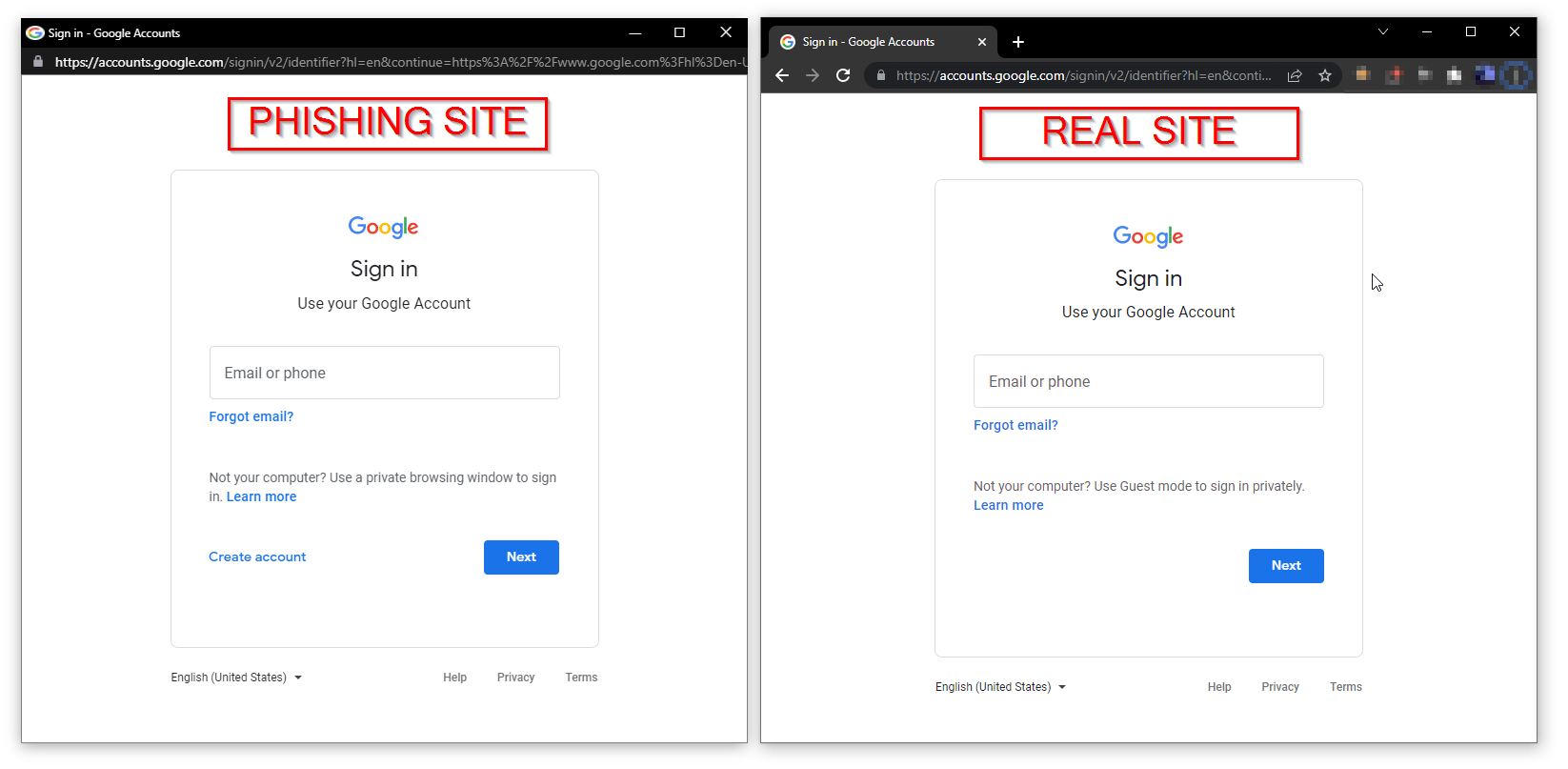
A Browser-in-the-Browser (BitB) attack is a modern phishing technique that does not rely on fake login pages.
Instead, it abuses a simple truth:
If you interact with a real website inside a controlled environment, security measures can still fail.
In a BitB attack, the victim unknowingly interacts with a real browser session running on a remote system. The login page, branding, URL behavior, and authentication flow are all legitimate—because they belong to the real service.
The deception lies not in the website, but in where the browser is running.
Think of it like this:
You didn’t give your house keys to a thief.
You walked into their house and unlocked your door from the inside.
Why Browser-in-the-Browser Attacks Are So Dangerous
They Bypass Human Trust Signals
Most users are trained to look for:
- Correct branding
- Familiar login pages
- Successful two-factor authentication
- Expected redirects after login
BitB attacks pass every single one of these checks.
There’s no typo-filled domain.
No broken CSS.
No suspicious error messages.
Everything looks right—because it is.
They Undermine Two-Factor Authentication (2FA)
This is the part that unsettles security professionals.
BitB attacks do not “break” 2FA.
They sidestep it.
Because the login happens in a real browser:
- One-time passwords work
- Push notifications work
- SMS codes work
- QR-code authentication works
From the service’s perspective, the login is legitimate.
From the user’s perspective, everything behaves normally.
The attacker doesn’t steal credentials before login—they take control after authentication succeeds.
How BitB Attacks Work (Conceptual, Non-Technical)
At a high level, a Browser-in-the-Browser attack involves three layers:
1. The Presentation Layer
- The victim opens a web link
- It displays what looks like a normal login page
- The browser window behaves realistically
2. The Execution Layer
- The browser session is actually running elsewhere
- User input is relayed in real time
- The attacker observes or controls the session
3. The Control Layer
- Once login succeeds, the attacker can:
- Terminate the victim’s access
- Maintain their own session
- Extract session tokens or data
Importantly, no fake website is required.
That’s what makes BitB fundamentally different from classic phishing.
Why Traditional Security Advice Often Fails Here
Most security advice focuses on recognition:
- “Check the URL”
- “Look for HTTPS”
- “Watch for spelling errors”
- “Enable two-factor authentication”
BitB attacks exploit the gap between recognition and control.
The victim recognizes the site correctly—but does not control the environment in which the site is running.
It’s like checking the lock on a door that isn’t yours.
Common Accounts Targeted by BitB Attacks
Browser-in-the-Browser attacks typically focus on accounts that allow secondary access escalation, such as:
- Email accounts (password resets)
- Messaging platforms
- Cloud dashboards
- Developer accounts
- Business admin panels
Why these?
Because one successful login often unlocks many more accounts downstream.
Key Warning Signs of a BitB Attack
BitB attacks are subtle—but not invisible.
Here are behavioral red flags, not technical ones:
Unusual Browser Behavior
- Login pages that feel “embedded”
- Inconsistent resizing or scaling
- Missing native browser UI elements
- Keyboard behavior that feels slightly delayed
Strange Session Drops
- Sudden disconnection after login
- Being logged out immediately after authentication
- Being told the session “expired” unusually fast
Unexpected Context
- “Beta portals”
- “AI-powered login tools”
- “Temporary access systems”
- “New web versions” sent via unsolicited links
The danger isn’t the technology—it’s the story wrapped around it.
Defensive Strategies Against Browser-in-the-Browser Attacks
1. Treat Login Context as Seriously as Login Credentials
Ask one question before logging in:
“Why am I logging in here instead of my usual way?”
If the answer involves:
- A third-party link
- A “special” access portal
- A shortcut that bypasses your normal workflow
Pause.
That pause alone stops most BitB attacks.
2. Prefer Native Apps Over Browser Logins When Possible
Native applications:
- Control their own execution environment
- Are harder to proxy transparently
- Reduce browser-based attack surfaces
This is especially important for:
- Messaging platforms
- Admin dashboards
- Cloud consoles
3. Use Hardware-Backed Authentication Where Available
Security keys and hardware-bound passkeys reduce BitB effectiveness because:
- They bind authentication to the local device
- They resist session replay
- They introduce physical presence requirements
While not perfect, they raise the attacker’s cost significantly.
4. Monitor Active Sessions Regularly
Many platforms allow you to:
- View active sessions
- See login locations
- Revoke unknown sessions
Make session reviews a habit—not a reaction.
5. Separate High-Value Accounts
Use different devices or browsers for:
- Email administration
- Financial access
- Cloud infrastructure
Isolation limits blast radius.
Why Education Is the Real Defense
BitB attacks don’t succeed because users are careless.
They succeed because trust models are outdated.
We trained users to spot fake pages—then attackers stopped using fake pages.
Understanding why BitB works is more valuable than memorizing rules.
Once you understand that environment matters as much as authentication, your threat awareness permanently improves.
Final Thoughts: Security Is Shifting, Not Failing
The Browser-in-the-Browser attack doesn’t mean the internet is broken.
It means the battlefield moved.
Security is no longer just about:
- Strong passwords
- Multi-factor authentication
- Secure websites
It’s about who controls the session.
And once you start thinking that way, BitB attacks lose much of their power.